Showing posts with label communication. Show all posts

Dec 1, 2011

mailvu video email and keek

.

hello everyone!! today i've been introduced to a very cool website which is called mailvu video email. 

WHAT IS
??

ever heard about it before??
THIS IS SOOO COOL. It is a website where you can record a video of you and you can share it with your friends by sending them an email.

the caption of this website:


Kinda cool, isn't?

This website is free and it has a 14 days free trial. What's the difference then?
the free version:videos can be emailed to others but can't be embedded onto other websites
the paid/14 days free trial version:videos can be emailed to others, can be embedded and many more features available.
 so, take this chance! sign up! record your video! send it to your friends! 


to use this one, you have to sign up an account, but if you want to use the free version, you don't need to sign up.


LET'S DO IT!

go to HERE, then click learn more about free account


then sign up (if you want to try the 14 days free trial version)

 choose free plan.try first before you upgrade it to business plan, then click sign up

after you've sign up, this is your dashboard. click on pictures for bigger view. 

if you want to record a video, you MUST allow access to your mic and webcam, if you deny, you can't record a video

a recording window will pop out and you can start recording.there is time remaining stated there, you can replay the recorded video. you can send it to other people or you can share it with others

send it to your friends

if you want to upload a video from your computer

you can also view you saved videos, you can either send it or delete it

this is how it looks when you got the invitation to view the video email. just click on the PLAY button


then, it will direct you here. you can reply the video or create your own video mail.


As a language teacher, I think I can use this tool in my classroom. How??
  • I can ask students to decide the most favourite item that they like to use (eg:shampoo, toothpaste etc), record a video of the students promoting the item and persuade their classmates to buy the item. *students get to learn different skills:the use of persuasive language, personalisation is involved here as students describe the item that they like, enhance speaking ability*
  • ask students to describe the unique/strange experience in their life and record it at home, then send it to the teacher's email. this can be done as a homework *less formal so students can express themselves in front of videocam,personalisation since the topic is about students itself, lower affective filter (Krashen,1987) because students don't have to talk in front of the class, so motivate them to be more confident*
  • ask students to record an interview with a friend  by asking them a set of personal questions about your friends. *This can make students motivated because they have purpose for listening and asking (communicating meaningfully) and they can communicate using authentic language. Moreover, students will be more relaxed because it's a communication between two speakers.*
  • asking students to record a video of a student sharing things that they are good at (eg:cooking, wearing scarfs with different styles, make up tutorials and etc). This can be done monthly. *this kind of thing really help students not only in terms of language ability, but also in terms of content; expand students general knowledge by sharing and exchanging opinion about different things*
  • can be used to do a listening activity  as well, where teacher could record a video he/she talking about a topic, play the video in the classroom, and give students a set of questions to answer/ask them to write an essay/discuss about the topic in groups *students' listening skills can be improved, writing skills too, or communicating skills if they are asked to discuss the topic with friends*


I LIKE IT. WHY??
  • by using this, there are changes in the types of homework, not only writing in a book, but recording a video, and I think this what makes it cooler! students don't have to submit it by hand, rather just by email
  • it can connect the practise that students did in classroom with homework. So this is one of the connected classroom activities. In my opinion, it is more effective way of learning because when they go home they won't feel the burden of a homework, rather they will feel that it is something fun to do (because i think students nowadays love internet sooo much)
  • the files can be sent to people, can be deleted and saved in your own account
  • if you get an invitation to view others' video, you can reply it by using the same way
  • you can embed it to the other websites
  • you can share videos with other people and this will encourage a lot real interaction, so your speaking skills as well as listening skills can be improved


THINGS THAT I HATE ABOUT IT.WHY?
  • sometimes there are some technical problems happen; eg: i) when you press backspace key whilst you are filling the details to send the email to whom, the page will suddenly disappear, and you have to fill in the recipients' details again, ii) when a problem occur, the video can't be recorded even after you've refreshed the page. this might also be because there are many people using this website as the same time *it happened to me many times before*
  • people who get invited can only view the video, but they can't download it. the only person who can download it is the video maker
  • it is not free. Only free for 14 days.so after 14 days you have to buy it in order to use it
  • the duration of recording is limited to 10 minutes


THERE IS ANOTHER WEBSITE THAT IS QUITE SIMILAR TO MAILVU, WHICH IS CALLED

IT IS QUITE SIMILAR to MAILVU in terms of:
-the way it can be used in the classroom
-the way of how it works
-the application is available for iPhones and smart phones' users

BUT, THE DIFFERENCES ARE:
-it's FREE but you have to sign up to use it
-it can be embedded onto the other websites and can be emailed to others as well
-it only allows 30 seconds recording


SO THESE ARE SOME SNAPSHOTS FROM KEEK:


homepage

steps to record a video

your profile. people can comment by videos or written comment


your dashboard


SOOO???


SIGN UP! RECORD! SEND!

GOOOOOO!!

.that's it.


.

Nov 24, 2011

ellloenglish

.


ELLLO ENGLISH!!! 
triple L.wow!

WHAT IS IT?
it is an English Listening Lesson Library Online (ELLLO), where people can do listening activities, learning vocabulary and downloading audio files, notes and etc.

LET'S EXPLORE IT MORE!!

this is the homepage

content and categories available

can connect with tweeter

LET'T LOOK INSIDE:

one example, scenes

this is a list of scenes topic. there's a lot more actually


choose one

basically, this is how it looks like.zoom for bigger view


in the transcription above, there certain phrases highlighted in blue colour. when you click in the play button, the phrases will be pronounced twice and after that it will pronoun the next highlighted phrases using correct pronunciation

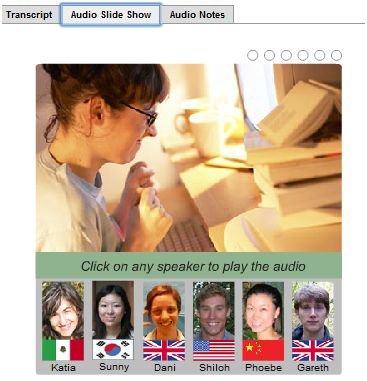
there's also an audio slide show

and audio notes as well

there are also exercises available on the right hand side of the page

LET'S TRY THE OTHER CATEGORIES, VIDEOS

list of videos available

videos created by people from all over the world

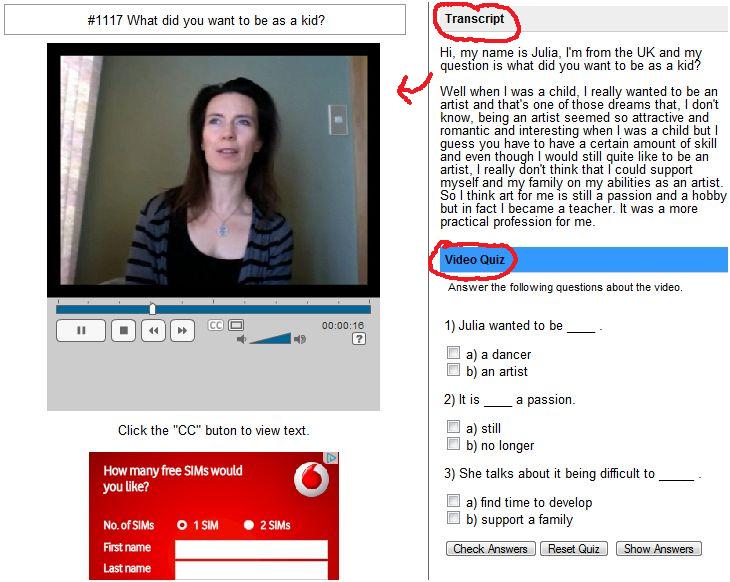
an example

there are transcription and quizzes to be looked at


THEN , NEWS!


there is a news reading, exercises and vocabulary explanation


THEN THE LAST ONE THAT I'VE TRIED, MIXER


quite similar to the other categories. some audios or notes can be downloaded


IS IT A GOOD WEBSITE? yessss. WHY?

1. it is a very well organised website because
-easy to be accessed because there's a home button there in which people can go back to home anytime they want
-the lesson is nicely arranged in order, people can see it clearly at the left hand side of the page
-it is arranged according to the categories, and under that it is arranged by topics
-it is easy to download, just right click on the linked words
2. it gives the transcriptions of all the listening audio, so it is very useful for people who want to check whether they listen correctly or not
3. we can click on certain phrases to listen to the right pronunciation of the phrases. the phrases are pronounced twice, then the descriptions of the phrases and the examples of sentences are also given straight away and questions are given as a practise. 
4. there are 3 types of exercises given based on the vocabulary highlighted, comprehension, listening activities where students can listen to the vocabulary highlighted and how to use it. possible answers are also given
5. people can download both notes and audio files for free
6. you don't have to sign up to use this website, so you can freely use this anywhere and anytime you want provided that you've got an access to the internet
7. there are many choices available (eg:views, games, mixer, videos, news, scenes, songs, points and many more)


IF IT IS A GOOD WEBSITE, WHY CAN YOU USE IT IN THE YOUR CLASSROOM AND HOW DOES IT IS CONNECTED WITH THE CURRENT UNDERSTANDING OF LANGUAGE LEARNING?

-it is important for a language learners to listen to a variety of accents so they can know what are the differences between native speakers and non-native speakers of english and ways of how different people around the world use English
-it helps in vocabulary enhancement in terms of pronunciation and information on how to use the words correctly
-the materials are authentic because most of the videos are recorded by themselves so students can learn how do people actually use/communicate in English (english that we won't hear on the script) *real language use vs. language in the book*
-it encourages autonomous learning in which students can learn and doing tasks without teacher's help, independently
-students will be exposed to different types of texts, how the language is used in everyday situations (different text require different styles, vocab, jargon)
-it provides variety of topics so students can choose the topics of their interest, in addition increase their general knowledge can be expanded (content learning through language *CLIL*)
-it helps in developing variety of skills (eg: writing, reading, speaking, listening)because it offers students with the opportunities to practise these skills.
-it provides context (real audience and purpose so there will be a reason to listen/read (language is learned through context, not isolated)
-it contains a variety of levels, so students can choose levels that are suitable for them
-students can enjoy while learning language by choosing the audio that is lower than their levels


WHAT I DON'T LIKE:

-some of the audio/videos have low quality in terms of background noise, the video resolution, the flow of the speakers' voices, the sound of the voice itself
-there are errors after certain times using it (it happened to my friends, i don't know the reason why)
-On the homepage, the categories appear randomly. Suddenly, there will be more options/categories appear, so you can't really see all the categories at one time
-some of the activities (eg: scenes) are not really authentic (it is made as authentic), so it's not really helping students in communicating in reality (videos is a different case)


THAT'S IT!!! TRY IT!!


.

Nov 3, 2011

wallwisher

.

WHAT is IT???
an online board where people can add/paste their messages (eg:discussion regarding a topic, announcement making, keeping short notes or main ideas, brainstorming in classroom/discussion, etc)


DO YOU WANT TO TRY IT???
click HERE


AFRAID??DON'T KNOW HOW TO USE IT??
WELL, LEARN THE STEPS HERE:

 STEP 1

 STEP 2

 STEP 3

STEP 4

STEP 5

NOTES THAT HAVE BEEN PASTED EVERYWHERE

NOTES CAN BE DRAGGED

 OTHER EXAMPLES


HOW CAN I USE IN MY CLASSROOM??

  1. I can use it for students to brainstorm their ideas about certain topics that I want them to discuss
  2. I can give students main points on certain topics (eg:writing exercise) and ask them to write an essay from the main points
  3. I can ask students to discuss about certain topics or issues outside the classroom
  4. I can ask students to give feedback randomly after my teaching lesson or after doing some activities
  5. I can ask students to take notes of my teaching
  6. Can share a discussion/ideas/information with students as they can save it for their reference in the future

WHY USE IT?IS IT GOOD?WHY?? WHY??

  1. it's quick because you only have to double click anywhere on the wall to post your messages then click OK
  2. it helps or encourage students who are not active in class to express themselves more because this wall doesn't involve face to face communication
  3. students can delete their post if they want to
  4. students can use their own names or write on the wall anonymously
  5. students will feel more relax because the environment of giving ideas is not formal (casual style of learning/discussing)
  6. it's FUN and of course because it's FREE!!
  7. it can made public or private
  8. people can put up as many notes as they want to
  9. not only words can be shared, but other things such as videos, photos and audio links as well
  10. the wall can be saved by others as well as the host
  11. you don't need to sign up or subscribe the page, so it's very easy to use
  12. encourage students' participation as students can write everything that they want to
  13. you can post on people's wall as long as you know the url of their wall

BUT.................


  1. the word limit is limited to 160 words, so students have to write into two separate boxes to express the same ideas if the words are too long
  2. it can distract students to write things that is not so related to the topic as they will feel that the wall is not formal and they can chat about other topics
  3. not really helping students in term of speaking skills (more passive way of learning and expressing ideas in the classroom)
  4. the wall might jam when too many people are writing at the same time and you need to refresh it every time you want to read it
  5. if you are the host and you have a lot of guests/notes poster, you will find it messy because there will be lots of notes sticking on each other


TRY IT YOURSELF!!!
=))


.

Oct 13, 2011

dvolver

~DVOLVER~


this short video is created using Dvolver movie maker. It's a quite fun websites where people can create their own short videos by using their own dialogues, music, setting, and characters.

These are the way to do it:


you can choose your own background and sky, according to your idea and interest


then choose your plot, depending on what story line you want to create


then select your own characters who are suitable with your background and plot


then create your own dialogues. not more than 100 words.


choose your background music which can lighten up your story


lastly, choose your title design that you are interested in. Don't forget to put your title of the video and your name in the boxes (like i did ~_^)


and now your video is finish! you can send it to whoever you want

and you can copy the code then embed it onto your blog/facebook

xoxoxoxoxoxoxoxoxoxoxoxoxoxoxoxoxoxoxoxoxoxoxox

This website can be a good tool for students to learn English. The reasons include:

  • it's free so people or students especially don't have to pay for it
  • it's fun because it involves sounds and visuals and tend to make students really engaged to the work
  • it involves real life communication where students can choose their own context then use their own dialogues to make a story
  • students will have freedom of choice in terms of creativity and language use, thus it motivates students to express themselves by using authentic language
  • it also has a variety focus where students can enhance their vocabulary items, improve their spelling, having freer communication and might be changing their view on learning english from boring to fun 

However, there might be some problems with using this website as a tool of learning english:

  • the words can be used to write a dialogue is only limited to 100 words, so students can't write as much as they want
  • students might use inappropriate language because they are given too much freedom 
  • not all students will have access to internet at their home
  • unsuitable graphics for students eg:the characters' attire
  • the video can't be edited after you've closed the browser, so if there's any mistake happened, students have to create the new one
  • there are limited plot available, so students can't really create their story in a various ways


I forgot to put the title and the producer for the short video above.If you are interested, click HERE and try it!!. Have fun learning! =))

.